
Contractor Website Design Examples: What the Best Do
Most lists of contractor website design examples are a scroll of pretty homepages. Pretty doesn't book jobs. A homeowner about to spend real money is looking for proof: work like theirs, people who vouch for you, and an easy way to reach you.
This post breaks down what the best contractor websites actually do, section by section, with a real before and after from one of our clients. If you want the bigger picture first, start with our contractor marketing guide.
What do the best contractor websites have in common?
The best contractor websites say what they build and where on the first screen, show real projects sorted by job type, put license, insurance and reviews where people look, and make calling or asking for a quote easy from a phone. The design style varies a lot. Those parts almost never do.
- Trade and towns in the headline
- Tap-to-call on every page
- A page for each kind of job
- Real project photos, not stock
- License and insurance in plain sight
- Recent reviews from real clients
- A quote form that asks the right questions
- Pages for the towns they actually work in
Notice what's not on the list: video backgrounds, sliding banners and clever animations. Those can be fine, but they never make up for a missing project page or a buried phone number.
A real contractor website design example: before and after
Premium Structures, a tiny home and portable building builder in Missouri, came to us with a Squarespace site. We rebuilt it around what their buyers search for and the proof those buyers need. About five weeks later it was on Google's first page for several searches, and Google's AI search was citing it.
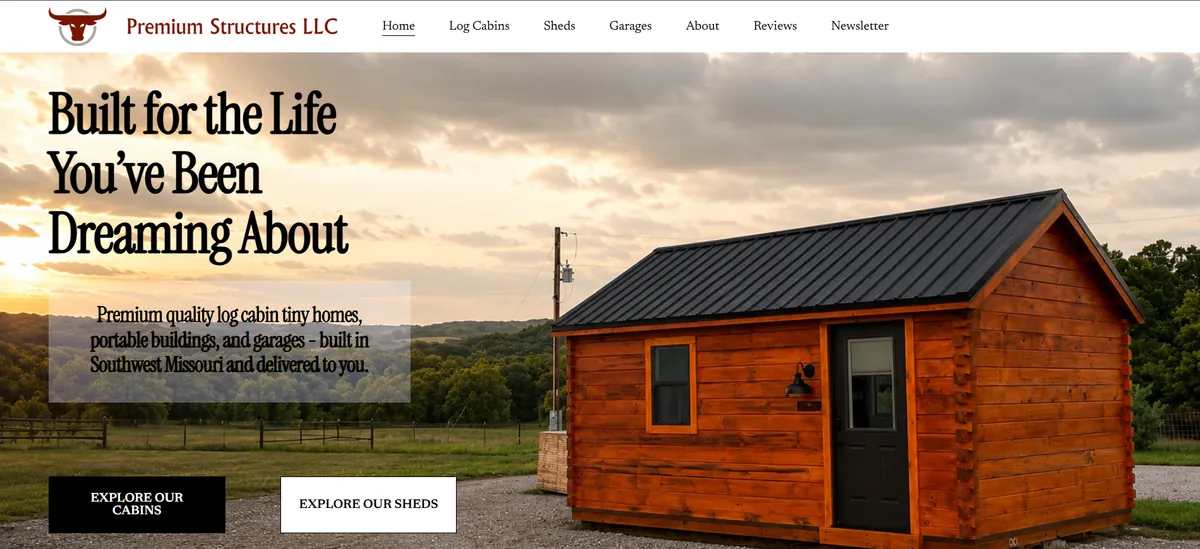
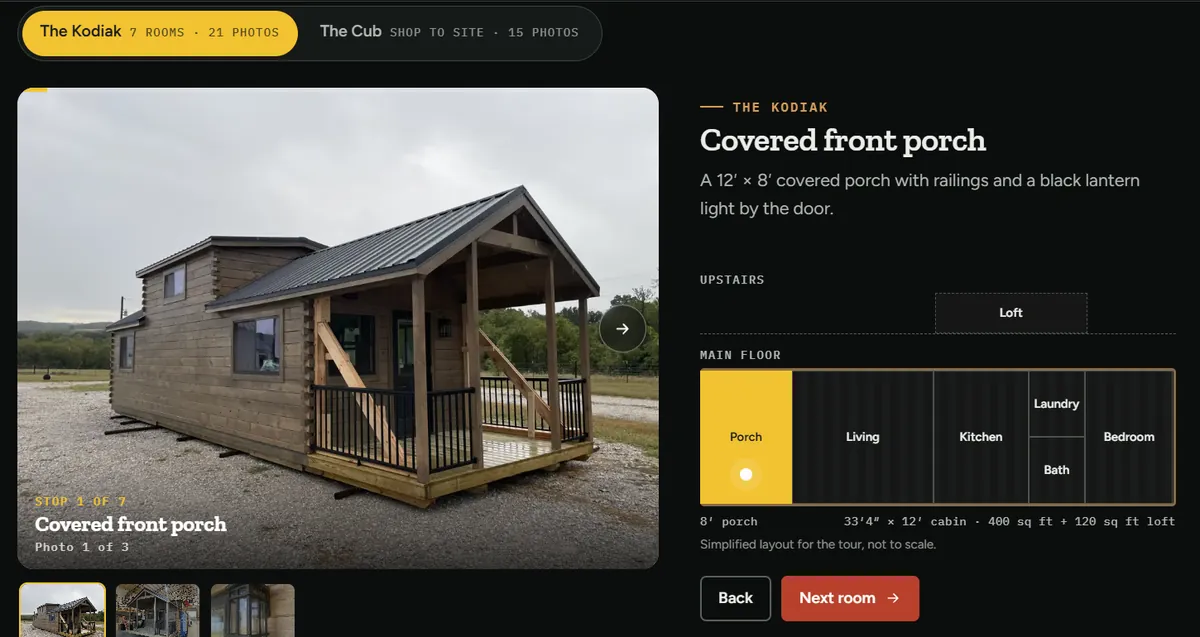
What changed. The new site leads with what they build and where they deliver. Each main delivery state got its own page with real questions answered and real photos. Buyers can tour a cabin room by room before they ever call, and a blog answers the questions people type into Google before buying.
What the results looked like. One of the blog posts, on Missouri tiny home laws, reached Google's first page, and Google's AI search started citing the site first. That's the payoff of building pages around real questions instead of a single pretty homepage.
From Collin
Premium Structures delivers to all 48 mainland states, and at first we talked about a page for every state. We kept the main eight instead, each one with its own questions and photos, and a footer line that tells people they deliver everywhere else too. Eight real pages beat forty-eight thin ones.
What should the first screen of a contractor website say?
The first screen should say what you build, where you build it, and how to reach you, in that order. A visitor decides in a few seconds whether they're in the right place. Your company name alone doesn't tell them, and it doesn't tell Google either.
Google itself advises thinking about "the words that a user might search for", according to its SEO starter guide. Homeowners search for the work, like "kitchen remodel" or "home addition contractor", plus a town. Put those words in your headline. Clear wording like this is also what Google's AI answers pick up; here's how contractors show up in AI search.
Weak: "Smith Construction. Quality You Can Trust."
Strong: "Home additions and kitchen remodels in Lake Charles. Licensed, insured, 40+ five-star reviews." Then a tap-to-call button and a quote button right under it.
How do the best examples show their projects?
They give each kind of job its own page and fill it with their own photos: before, during and after. A homeowner planning an addition wants to see additions, not a mixed gallery of decks, roofs and driveways. A short note on scope, timeline and town makes each project believable.
If you only have phone photos, use them. Google's starter guide asks for images that are "sharp and clear" and placed near the text they relate to, and a real photo of your own crew beats a polished stock image every time.
Our contractor website checklist has the full list of pages and what goes on each one.
Where do great contractor websites put trust signals?
Right where the decision gets made: near the top of the homepage, on every service page and next to the quote form. License and insurance, years in business, real reviews and a photo of the owner or crew do more selling than any headline. Hiding them on an About page wastes them.
- 97%read reviews for local businesses
- 74%look for reviews from the last three months
- 47%won't use a business with fewer than 20 reviews
Recent reviews matter most, so the best sites pull in fresh ones instead of five quotes from three years ago. We never write reviews for clients; everything shown is real.
What do the best contractor quote forms ask?
Good quote forms ask for the project type, rough timeline, town and a budget range, plus name and phone. That lets you tell a real project from a price check before you drive out. Keep it short enough to finish on a phone in under a minute.
- Project type: a short list to tap, like addition, remodel, new build, deck, other.
- Timeline: this month, in 1 to 3 months, just planning.
- Budget range: optional, but it saves you wasted trips.
- Town or ZIP: so you know if it's in your area.
- Photos: optional upload for the space or the damage.
Do contractor website examples look different on a phone?
They should. Most people find a contractor on their phone, and Google uses the mobile version of a site for ranking. On a phone the best examples keep the call button in reach, stack project photos so they load fast, and keep forms short.
Google says it uses the mobile version of a site for indexing and ranking, so a site that only looks right on a big screen is working against you. Every site we build has tap-to-call on every page and works on current phones, tablets and computers, and if something we built doesn't work as described, we fix it at no charge.
How do you get a contractor website like these?
You can build one yourself with a website builder, or hire a designer who builds for contractors. Either way, use the checklist above as your spec. What matters is that the site has the pages and proof that book jobs, and that someone keeps it current once the busy season starts.
We compare both paths honestly in website builder vs. web designer, and break down pricing in how much a contractor website costs. If you'd rather have it done for you, see our contractor website design service.
Frequently asked questions
What is the best website builder for contractors?
The best builder is the one you will actually keep updated. Wix and Squarespace both work for a simple start. The bigger question is whether you will add project pages, town pages and a review system, and keep them current.
How many pages should a contractor website have?
At minimum: a homepage, a page for each main kind of job, a projects or gallery page, an about page with license and insurance, and a contact page. Add a page for each town you really work in once the basics are done.
Quick summary
- The best contractor websites say what you build and where on the first screen.
- Each kind of job gets its own page with your own photos.
- License, insurance and recent reviews sit where the decision gets made.
- Quote forms ask project type, timeline, town and budget, and work on a phone.
- Premium Structures moved off Squarespace and reached Google's first page in about five weeks.